


Select your vehicle brand and the topic you are interested in.
Warning lights and driver messages
Warning lights and driver messages
Engine, lubrication and cooling

EPC – petrol engine management
Yellow / amber · Warning · Steady
Meaning
The petrol engine management system has detected a fault. EPC does not identify a particular failed component.
Recommended action
Arrange engine inspection promptly. Brief illumination with the ignition on is a check; the lamp should go out after starting.
Key indication
This is an example of an indication. Check its meaning for your specific model and equipment against the exact message and your vehicle’s owner’s manual.

Emissions system – MIL steadily lit · multiple meanings of the same symbol
Emissions system – MIL steadily lit
Yellow / amber · Warning · Steady
Meaning
An emissions system fault has been detected. The symbol alone does not identify a failed component.
Recommended action
Reduce load and arrange inspection as directed by the manual and message. If running is abnormal, other warnings appear or STOP is displayed, stop safely and seek assistance.
Key indication
This is an example of an indication. Check its meaning for your specific model and equipment against the exact message and your vehicle’s owner’s manual.
Flashing MIL – misfiring
Yellow / amber · Warning · Flashing
Meaning
Flashing may indicate misfiring that can damage the catalytic converter. This differs from a steadily lit MIL.
Recommended action
Reduce speed and load and arrange inspection in accordance with the message. If the engine shakes severely or loses power, stop safely and obtain professional assistance.
Key indication
This is an example of an indication. Check its meaning for your specific model and equipment against the exact message and your vehicle’s owner’s manual.

Low engine oil pressure
Red · Warning · Steady / flashing
Meaning
Lubrication pressure is too low. A correct oil level does not confirm sufficient pressure.
Recommended action
Stop safely and switch off the engine. If the warning persists, even with the correct level, do not leave it idling; obtain professional assistance. Follow the manual for further steps.
Key indication
This is an example of an indication. Check its meaning for your specific model and equipment against the exact message and your vehicle’s owner’s manual.

Electric drive coolant warning
Red · Warning · Flashing
Meaning
On the listed Born, coolant temperature is too high or coolant level is too low. This is a separately documented electric-drive application.
Recommended action
Stop safely, switch off the drive and allow it to cool. Check as instructed; do not open a hot reservoir. If the warning remains despite the correct level, do not continue and seek professional assistance.
Key indication
Together with the red high-voltage symbol this is a different combined warning: stop immediately, switch off the drive and seek assistance. This is not general permission to add coolant to an overheated high-voltage system.
Brakes and stability systems

Brake system fault · multiple meanings of the same symbol
Brake system fault
Red · Warning · Steady
Meaning
The red warning indicates a brake system fault. Read the accompanying message; this is not the normal parking brake confirmation.
Recommended action
Stop safely. Do not continue driving and obtain professional assistance. Topping up fluid does not repair the cause of fluid loss.
Key indication
This is an example of an indication. Check its meaning for your specific model and equipment against the exact message and your vehicle’s owner’s manual.
Low brake fluid level
Red · Warning · Steady
Meaning
A message with the red brake symbol indicates that the brake fluid level is too low.
Recommended action
Do not continue driving. Stop safely and obtain professional assistance; low fluid can lead to brake failure.
Key indication
This is an example of an indication. Check its meaning for your specific model and equipment against the exact message and your vehicle’s owner’s manual.
Electromechanical brake servo not working
Red · Warning · Steady
Meaning
Brake assistance is not working. More pedal force is required and stopping distances increase.
Recommended action
Stop safely, applying greater brake pedal force as required. Do not continue driving; obtain professional assistance immediately.
Key indication
This is an example of an indication. Check its meaning for your specific model and equipment against the exact message and your vehicle’s owner’s manual.

Brake pad wear
Yellow / amber · Warning · Steady
Meaning
The system indicates that the brake pads require inspection.
Recommended action
Arrange prompt professional brake inspection and pad replacement as required. The lamp does not indicate how many kilometres remain before replacement.
Key indication
This is an example of an indication. Check its meaning for your specific model and equipment against the exact message and your vehicle’s owner’s manual.

ABS fault
Yellow / amber · Warning · Steady
Meaning
The anti-lock braking system is not working correctly or is unavailable. Normal braking may remain available without ABS protection.
Recommended action
Arrange professional inspection promptly. If a red brake warning or STOP instruction also appears, stop safely and follow the exact message.
Key indication
This is an example of an indication. Check its meaning for your specific model and equipment against the exact message and your vehicle’s owner’s manual.

ESC / TCS intervention · multiple meanings of the same symbol
ESC / TCS intervention
Yellow / amber · Operating information · Flashing
Meaning
Flashing indicates that stability or traction control is intervening. It does not by itself indicate a fault.
Recommended action
Adapt speed and driving style to available grip and traffic conditions. The system cannot overcome physical limits.
Key indication
This is an example of an indication. Check its meaning for your specific model and equipment against the exact message and your vehicle’s owner’s manual.
ESC fault or system-induced deactivation
Yellow / amber · Warning · Steady
Meaning
A lamp that stays on after the initial check may indicate a fault or system-induced deactivation. This differs from flashing during intervention.
Recommended action
Read the message and follow the cited manual. If the lamp remains on, arrange professional inspection; do not rely on stability control being available.
Key indication
This is an example of an indication. Check its meaning for your specific model and equipment against the exact message and your vehicle’s owner’s manual.

Parking brake applied · multiple meanings of the same symbol
Parking brake applied
Red · Operating information · Steady
Meaning
A red P in a circle confirms that the parking brake is applied. It is an operating status, not automatically a fault.
Recommended action
Release the parking brake as instructed before driving away. When parking, check that the vehicle is secured safely.
Key indication
This is an example of an indication. Check its meaning for your specific model and equipment against the exact message and your vehicle’s owner’s manual.
Parking brake – insufficient holding force
Red · Warning · Flashing
Meaning
On a stationary vehicle, a flashing P with the message means the vehicle cannot be parked safely on the current slope.
Recommended action
Secure the vehicle and park elsewhere, preferably on level ground. This entry does not cover a flashing parking brake lamp while driving.
Key indication
This is an example of an indication. Check its meaning for your specific model and equipment against the exact message and your vehicle’s owner’s manual.
Parking brake not fully released while driving
Red · Warning · Flashing
Meaning
While driving, the red P flashes and the brake warning also lights up. The system reports that the parking brake has not fully released.
Recommended action
Follow the message, stop safely as required by the situation and arrange inspection by a specialist workshop.
Key indication
This is an example of an indication. Check its meaning for your specific model and equipment against the exact message and your vehicle’s owner’s manual.

AUTO HOLD – vehicle held
Green · Operating information · Steady
Meaning
The green inscription confirms that the function is currently holding the stationary vehicle.
Recommended action
Check the active state before releasing the brake pedal. The function does not replace safe parking; do not leave the vehicle with the drive system on.
Key indication
This is an example of an indication. Check its meaning for your specific model and equipment against the exact message and your vehicle’s owner’s manual.

AUTO HOLD – switched on, not holding
Grey · Operating information · Steady
Meaning
The grey inscription means the function is switched on. It does not mean the brakes are currently holding the vehicle.
Recommended action
Keep the brake pedal pressed as necessary. Active holding is confirmed by the green inscription; secure the vehicle properly when parking.
Key indication
This is an example of an indication. Check its meaning for your specific model and equipment against the exact message and your vehicle’s owner’s manual.

ESC/TCS – deactivation or Sport mode, OFF symbol
Yellow / amber · Operating information · Steady
Meaning
In this edition, the amber skidding-car OFF symbol denotes manual TCS deactivation, ESC Sport or manual ESC deactivation, depending on equipment and message. It is not conflated with flashing intervention or a steady fault indicated by the plain skidding-car symbol.
Recommended action
Check the selected mode. Limited or disabled stability control changes the safety margin; select the mode only under suitable conditions following the manual.
Key indication
Some versions also use a separate ESC OFF inscription. That different graphic is not presented here as the same image.

ESC OFF – stability control switched off
Yellow / amber · Operating information · Steady
Meaning
The separate amber ESC OFF inscription indicates deactivated stability functions according to the specified manual. Not automatically a fault and not the plain skidding symbol.
Recommended action
Allow for the reduced safety margin. Use the mode only when required by conditions and allowed by the manual; restore stability control as soon as possible.
Key indication
Distinguish Sport mode, TCS deactivation and full ESC deactivation by message and exact symbol. An ignition function-check phase may occur.

Brake servo – restricted operation, amber warning · multiple meanings of the same symbol
Brake servo – restricted operation, amber warning
Yellow / amber · Warning · Steady
Meaning
With the documented amber warning, electromechanical braking assistance is restricted. Pedal pulsations may occur and stopping distance can increase.
Recommended action
Allow for greater brake-pedal effort and seek professional service. Other simultaneous messages, including STOP, take priority; amber is not universal assurance that continued travel is safe.
Key indication
Different from red servo failure with the instruction not to continue. In another message the same sign can refer to another brake component; exact text and cited edition are decisive.
Electronic parking brake – amber fault (Terramar)
Yellow / amber · Warning · Steady
Meaning
This version’s amber message indicates an electronic parking-brake fault. It is not the normal red confirmation that the parking brake is applied.
Recommended action
Visit a specialist workshop. When parking, ensure the vehicle is safely secured against movement and follow the exact message. Any simultaneous STOP warning takes priority.
Key indication
Verified for Terramar 11.2025, overview p.13 and specific fault instructions pp.228–229. The same amber circular sign can indicate restricted brake assistance with a different message; the meanings are separate.
Steering, chassis and tyres

Low tyre pressure or tyre damage · multiple meanings of the same symbol
Low tyre pressure or tyre damage
Yellow / amber · Warning · Steady
Meaning
The system detected a significant change from stored values. The listed versions use indirect monitoring based on ABS data.
Recommended action
Stop safely and check all tyres and pressures. Store reference values only after proper inspection and correction; resetting does not repair a puncture.
Key indication
This is an example of an indication. Check its meaning for your specific model and equipment against the exact message and your vehicle’s owner’s manual.
Tyre pressure monitoring fault
Yellow / amber · Warning · Flashing, then steady
Meaning
The lamp flashes for approximately one minute and then stays on. This indicates a system fault, not confirmation of correct pressures.
Recommended action
Check tyres and pressures first. Follow the manual for restarting and calibration; obtain professional inspection if the fault persists.
Key indication
This is an example of an indication. Check its meaning for your specific model and equipment against the exact message and your vehicle’s owner’s manual.

Steering – red warning · multiple meanings of the same symbol
Steering – red warning
Red · Warning · Steady
Meaning
Steering fault; power assistance may be unavailable.
Recommended action
Stop safely and do not continue driving. Obtain professional assistance.
Key indication
This is an example of an indication. Check its meaning for your specific model and equipment against the exact message and your vehicle’s owner’s manual.
Steering lock – red flashing
Red · Warning · Flashing
Meaning
A flashing red symbol with the corresponding message indicates a steering-lock fault.
Recommended action
Stop the vehicle, do not continue driving and obtain professional assistance. Follow the exact message for the vehicle.
Key indication
Do not confuse this with the flashing amber fault or the amber lock-not-released state. On the 11.2020 Enyaq, switching the ignition off may then prevent the ignition from being switched on again, the steering from being locked or electrical equipment from being operated.

Steering – restricted operation · multiple meanings of the same symbol
Steering – restricted operation
Yellow / amber · Warning · Steady
Meaning
Steering assistance or response may differ from normal.
Recommended action
Follow the message and manual procedure. If the lamp remains on after that procedure, have the steering checked by a specialist workshop.
Key indication
This is an example of an indication. Check its meaning for your specific model and equipment against the exact message and your vehicle’s owner’s manual.
Steering – yellow flashing and column lock
Yellow / amber · Warning · Flashing
Meaning
The steering column is under tension or is not locking or unlocking correctly. Read the accompanying message.
Recommended action
With the vehicle stationary, follow the manual. If the column remains locked or flashing persists, do not continue; obtain professional assistance.
Key indication
This is an example of an indication. Check its meaning for your specific model and equipment against the exact message and your vehicle’s owner’s manual.
Steering – flashing amber warning (Terramar)
Yellow / amber · Warning · Flashing
Meaning
In this edition the flashing amber symbol relates to a steering fault or restriction. Steering may feel stiffer or more sensitive than usual. The symbol alone does not identify a steering-column lock fault.
Recommended action
First bring the vehicle to a safe stop. For this flashing version the manual specifies moving the steering wheel slightly to both sides and switching the ignition off and on. Observe accompanying messages. If flashing persists after switching on, do not continue driving; seek professional assistance.
Key indication
Only Terramar 11.2025 p.186. Steady amber has different instructions; the red fault requires stopping. Do not infer a cause from a similar lamp on another model.
Airbags and safety systems

Seat belt not fastened
Red · Warning · Steady / flashing
Meaning
The warning indicates an unfastened driver’s or passenger’s seat belt. It may flash and sound while driving.
Recommended action
Before driving, ensure all occupants fasten their belts correctly and children use an appropriate restraint.
Key indication
This is an example of an indication. Check its meaning for your specific model and equipment against the exact message and your vehicle’s owner’s manual.

Airbag and belt tensioner fault · multiple meanings of the same symbol
Airbag and belt tensioner fault
Yellow / amber · Warning · Steady / flashing
Meaning
The lamp stays on after the initial check or flashes. Airbags and belt tensioners may not work correctly.
Recommended action
Have the system checked immediately. Do not confuse it with the separate passenger airbag OFF indication.
Key indication
This is an example of an indication. Check its meaning for your specific model and equipment against the exact message and your vehicle’s owner’s manual.
Airbag / belt tensioners deactivated by diagnostic tester
Yellow / amber · Warning · Steady
Meaning
The symbol may accompany diagnostic deactivation of an airbag or belt tensioner. The signal sequence depends on model and edition: Enyaq iV 11.2020 and Octavia 11.2018 specify illumination for 4 s after ignition is switched on, followed by flashing for 12 s; Born 08.21 specifies illumination. Follow the exact message and the specific vehicle manual.
Recommended action
Ask a specialist workshop to check whether the system should remain deactivated. The symbol alone does not establish the cause.
Key indication
Only the listed versions and equipment are covered. Follow the exact message and your vehicle’s manual.
Lighting and visibility

Main beam headlights
Blue · Operating information · Steady
Meaning
Main beam or the headlight flasher is on.
Recommended action
Use them considerately and dip in good time to avoid dazzling others.
Key indication
This is an example of an indication. Check its meaning for your specific model and equipment against the exact message and your vehicle’s owner’s manual.

Rear fog light
Yellow / amber · Operating information · Steady
Meaning
The rear fog light is on. This is an operating indication, not an engine fault.
Recommended action
Use it according to visibility and applicable rules. Switch it off when visibility improves.
Key indication
This is an example of an indication. Check its meaning for your specific model and equipment against the exact message and your vehicle’s owner’s manual.

Exterior lighting fault
Yellow / amber · Warning · Steady
Meaning
The vehicle has detected a lighting fault. Identify the affected light from the message and inspection.
Recommended action
Check the lights and arrange repair. Follow the manual; some light sources are not user-replaceable.
Key indication
This is an example of an indication. Check its meaning for your specific model and equipment against the exact message and your vehicle’s owner’s manual.

Turn signals or hazard warning lights
Green · Operating information · Flashing
Meaning
Flashing indicates turn signals or hazard warning lights in operation. A faster rate may indicate a failed turn signal on the listed versions.
Recommended action
Check that the lights work correctly. Use hazard lights as appropriate when securing the vehicle.
Key indication
This is an example of an indication. Check its meaning for your specific model and equipment against the exact message and your vehicle’s owner’s manual.

Light Assist – automatically activated main beam, blue A
Blue · Operating information · Steady
Meaning
In the cited Enyaq, Born and Terramar editions, the blue A symbol denotes automatically activated main beam according to each edition’s own operating instructions. The neutral assistant-enabled indication is a different state.
Recommended action
Watch oncoming/preceding vehicles and other road users. Switch main beam off manually when necessary; an obscured camera or poorly lit road user may not be recognised correctly.
Key indication
Applies only to the listed model editions and equipment. Do not confuse with the Tarraco 06.2023 blue variant, whose own legend is documented separately. Intervene manually if dazzling is possible.
Driver assistance systems

Lane Assist active and available
Green · Operating information · Steady
Meaning
The system has detected conditions for lane keeping assistance. The green lamp does not indicate autonomous driving.
Recommended action
Watch traffic, keep your hands on the wheel and be ready to steer at all times. Observe lane detection limits and vehicle instructions.
Key indication
This is an example of an indication. Check its meaning for your specific model and equipment against the exact message and your vehicle’s owner’s manual.

Lane Assist steering correction
Yellow / amber · Operating information · Steady
Meaning
In this version, the yellow symbol indicates a corrective steering intervention. It differs from the fault symbol with an additional marking.
Recommended action
Watch traffic, keep your hands on the wheel and be ready to steer at all times. Observe lane detection limits and vehicle instructions.
Key indication
This is an example of an indication. Check its meaning for your specific model and equipment against the exact message and your vehicle’s owner’s manual.

ACC unavailable
Yellow / amber · Function restricted · Steady
Meaning
Distance regulation is unavailable. Possible causes include an obstructed radar view, misalignment or a fault; the symbol alone does not identify a defective sensor.
Recommended action
Control speed and distance yourself. Check accessible sensor areas as instructed; arrange professional inspection if the problem persists.
Key indication
This is an example of an indication. Check its meaning for your specific model and equipment against the exact message and your vehicle’s owner’s manual.
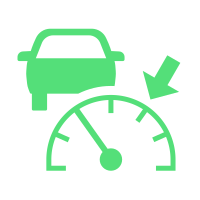
ACC regulating – no vehicle detected ahead
Green · Operating information · Steady
Meaning
Adaptive cruise control is regulating the selected speed, but no vehicle is detected ahead in this state. A different graphic version indicates a detected vehicle.
Recommended action
Watch traffic and be ready to brake. ACC may not detect every obstacle in time; respond immediately to a takeover or braking prompt.
Key indication
This is an example of an indication. Check its meaning for your specific model and equipment against the exact message and your vehicle’s owner’s manual.

Driver alert – break recommendation
White · Warning · Symbol with message
Meaning
The system recommends a break based on driving behaviour. It does not measure health or guarantee detection of every case of fatigue.
Recommended action
If tired, stop safely and rest. Do not wait for a system warning; the driver remains responsible for being fit to drive.
Key indication
White information version of the cup; display background and accompanying message vary by version.
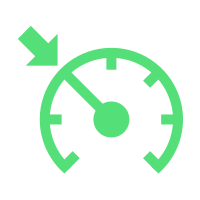
Cruise control actively regulating
Green · Operating information · Steady
Meaning
Cruise control is switched on and maintaining the selected speed. This does not confirm distance regulation.
Recommended action
Always adapt speed and safe distance to the situation yourself. Watch traffic, be ready to take control and do not use cruise control in unsuitable conditions.
Key indication
This is an example of an indication. Check its meaning for your specific model and equipment against the exact message and your vehicle’s owner’s manual.

Cruise control on, not regulating
Grey · Operating information · Steady
Meaning
Cruise control is switched on but is not currently regulating speed. The grey symbol differs from active green regulation.
Recommended action
Always adapt speed and safe distance to the situation yourself. Watch traffic, be ready to take control and do not use cruise control in unsuitable conditions.
Key indication
This is an example of an indication. Check its meaning for your specific model and equipment against the exact message and your vehicle’s owner’s manual.

ACC on standby, not regulating
Grey · Operating information · Steady
Meaning
ACC is on standby. A stored speed and distance do not mean the system is currently controlling speed or braking.
Recommended action
Watch traffic and be ready to brake. ACC may not detect every obstacle in time; respond immediately to a takeover or braking prompt.
Key indication
This is an example of an indication. Check its meaning for your specific model and equipment against the exact message and your vehicle’s owner’s manual.

ACC – take control and brake
Red · Warning · Steady
Meaning
Automatic ACC deceleration is insufficient in the current situation. The vehicle requests driver intervention. Do not confuse this red symbol with the green prompt during gear selection.
Recommended action
Take control of speed immediately and brake as necessary. Do not wait for ACC to resolve the danger by itself.
Key indication
This is an example of an indication. Check its meaning for your specific model and equipment against the exact message and your vehicle’s owner’s manual.

Take-over steering request
White · Information / warning depending on state · Steady
Meaning
The vehicle asks the driver to take over steering. This does not confirm that the system can handle the situation independently.
Recommended action
Safely take over steering, monitor traffic and follow the exact vehicle message. Be ready to brake.
Key indication
The indicator illuminates white and an accompanying prompt appears; the reviewed chapters do not state flashing. The red request has higher urgency. Association with Travel Assist, Emergency Assist or Lane Assist depends on equipment and the cited manual.

Take over steering immediately
Red · Warning · Steady
Meaning
The vehicle requests immediate driver steering control.
Recommended action
Safely take over steering immediately, monitor traffic and follow the exact vehicle message. Be ready to brake.
Key indication
The indicator illuminates red with an accompanying message; depending on the situation, a sound or steering-wheel vibration follows. The reviewed chapters do not state flashing. Association with Travel Assist, Emergency Assist or Lane Assist depends on equipment and the cited manual.

Lane Assist – Control Centre shortcut
White · Operating information · Control marking (not a warning)
Meaning
The white icon in the favourites menu identifies access to Lane Assist controls. It does not by itself confirm that the assistant is enabled, ready to intervene or correcting the course.
Recommended action
Change settings only while safely parked and check the actual state in the relevant menu and instrument cluster. Follow the manual for the actual equipment.
Key indication
The same system may use different operating indicators for different states. The control shortcut’s colour does not replace them.

Lane Assist – passive, not providing guidance
Grey · Operating information · Steady
Meaning
The grey operating indicator means Lane Assist is passive and not available for guidance. It differs from the white Control Centre shortcut and does not itself prove a camera fault.
Recommended action
The driver remains responsible for steering and keeping the lane. Observe messages, operating conditions and limits in the manual.
Key indication
Green denotes availability and yellow intervention; these documented states are not conflated with grey passive status.

Lane Assist – unavailable, symbol with exclamation mark
Yellow / amber · Function restricted · Steady
Meaning
The amber Lane Assist symbol with exclamation mark and message means the assistant is unavailable. Camera-view limitations, damage or faults may be responsible; the symbol alone does not identify a failed sensor.
Recommended action
The driver must steer. Follow the manual to inspect and clean the camera view and remove obstructions or stickers. Seek a qualified workshop if the problem persists; follow vehicle messages.
Key indication
The documented state is the steady amber car-between-lanes variant with an exclamation mark and unavailable message: Golf 5H0 11.2020, ID.4 11.2021, Terramar CS 11.25 and Tarraco DE 06.2023. Amber without an exclamation mark may mean corrective intervention, switched-on inactive operation or undetected markings in another precisely cited state; amber alone does not prove a fault.
Transmission and drive

Press the brake pedal
Green · Operating information · Steady
Meaning
The brake pedal is not pressed when engaging drive or changing the selector position.
Recommended action
Press the brake pedal and carry out the requested operation as instructed.
Key indication
This is an example of an indication. Check its meaning for your specific model and equipment against the exact message and your vehicle’s owner’s manual.
Battery and electrical system

Electric vehicle – red 12 V system warning
Red · Warning · Steady
Meaning
The 12 V battery is not being charged while driving or the on-board 12 V system has a fault. This electric vehicle is not described as having a conventional alternator failure.
Recommended action
Stop safely and do not continue driving. Switch off unnecessary electrical consumers and contact a specialist workshop.
Key indication
This is an example of an indication. Check its meaning for your specific model and equipment against the exact message and your vehicle’s owner’s manual.

12 V system – restart may be impossible · multiple meanings of the same symbol
12 V system – restart may be impossible
Yellow / amber · Warning · Steady
Meaning
With the restart-impossible message, the connection between the 12 V battery and on-board network is faulty. The drive may not restart after being switched off.
Recommended action
Follow the exact message and contact a specialist workshop. This entry applies to that message, not every yellow battery warning.
Key indication
This is an example of an indication. Check its meaning for your specific model and equipment against the exact message and your vehicle’s owner’s manual.
12 V system – monitoring or on-board supply fault
Yellow / amber · Warning · Steady
Meaning
The relevant message reports a fault in 12 V battery monitoring or the on-board network. It does not itself establish that the battery needs replacement.
Recommended action
Contact a specialist workshop and have the electrical system checked.
Key indication
This is an example of an indication. Check its meaning for your specific model and equipment against the exact message and your vehicle’s owner’s manual.
12 V battery – message requests inspection or replacement
Yellow / amber · Warning · Steady
Meaning
With the specific replacement message, the battery is nearing the end of its service life. Other yellow messages with the same symbol can have a different meaning.
Recommended action
Have the 12 V battery professionally checked and replaced if required. Follow the wording of the message.
Key indication
This is an example of an indication. Check its meaning for your specific model and equipment against the exact message and your vehicle’s owner’s manual.
Electric vehicles and plug-in hybrids

e-Sound / AVAS warning sound fault
Yellow / amber · Function restricted · Steady
Meaning
The electronic vehicle sound is not working. Other road users may not hear the approaching vehicle.
Recommended action
Drive with particular care and arrange prompt professional inspection as directed by the cited manual and any further messages.
Key indication
This is an example of an indication. Check its meaning for your specific model and equipment against the exact message and your vehicle’s owner’s manual.

Electric drive – reduced available power
Yellow / amber · Function restricted · Steady
Meaning
Available power is restricted and may decrease further depending on conditions. Charge level or high-voltage battery temperature may be involved; this is not an automatic diagnosis of battery failure.
Recommended action
Follow the message and power display and adapt driving to reduced acceleration. If charge is low, follow the manual and charge the battery. If safe driving is not possible, stop safely and obtain help.
Key indication
No remaining range is guaranteed. Red turtle indications have separate model-specific explanations; changing the colour does not preserve the procedure.

Born – battery too cold, normal driving unavailable
Red · Warning · Symbol with message
Meaning
On the cited Born, the red symbol with this message indicates very low high-voltage battery temperature and insufficient power for normal driving.
Recommended action
Do not continue normal driving. Secure the vehicle safely and follow the exact message and manual; charge the battery if its state of charge is low. Follow the manual for cold-weather battery preparation.
Key indication
This entry applies to the stated Born edition. It is not electric-drive overheating or a universal meaning of a red turtle on every EV.
Operating and information symbols

Start-stop – engine stopped automatically
White · Operating information · Steady
Meaning
The system is available and automatic engine stop is active. The ignition remains on and the engine can restart.
Recommended action
Switch off the ignition properly and secure the vehicle when leaving it. Disable start-stop as instructed before working in the engine compartment.
Key indication
This is an example of an indication. Check its meaning for your specific model and equipment against the exact message and your vehicle’s owner’s manual.

Start-stop unavailable or switched off
White · Function restricted · Steady
Meaning
Automatic stop conditions are not met or the function is switched off. The symbol alone does not diagnose a fault or a defective battery.
Recommended action
Follow any accompanying message. If the vehicle explicitly reports a system fault, arrange inspection; distinguish normal unavailability from a fault.
Key indication
This is an example of an indication. Check its meaning for your specific model and equipment against the exact message and your vehicle’s owner’s manual.

Central warning – priority 1
Red · Warning · Steady / flashing
Meaning
A high-priority warning accompanied by a specific message and possibly a sound. The triangle alone does not identify a failed component.
Recommended action
Stop safely, do not continue driving and follow the specific message. Obtain professional assistance as required.
Key indication
This is an example of an indication. Check its meaning for your specific model and equipment against the exact message and your vehicle’s owner’s manual.

Central warning – priority 2
Yellow / amber · Warning · Steady / flashing
Meaning
A malfunction or low operating fluid may cause damage. The accompanying message determines the exact meaning.
Recommended action
Check the indicated function promptly and follow the message. Yellow is not universal permission to continue driving.
Key indication
This is an example of an indication. Check its meaning for your specific model and equipment against the exact message and your vehicle’s owner’s manual.
Infotainment and control symbols
Controls and climate

MAX – windscreen demisting and defrosting
White · Operating information · Control marking (not a warning)
Meaning
This climate-control icon activates windscreen demisting and defrosting using dehumidified air and a high fan setting.
Recommended action
Use as needed to maintain visibility and adjust the function after demisting as instructed. This is not by itself a fault message.
Key indication
White is the schematic control colour in the cited manual; it does not confirm activation on every display. This is a control icon, not a fault warning.

REAR – heated rear window
White · Operating information · Control marking (not a warning)
Meaning
This control switches rear-window heating on or off under the conditions in the manual.
Recommended action
Use as needed to maintain visibility and adjust the function after demisting as instructed. This is not by itself a fault message.
Key indication
White is the schematic control colour in the cited manual; it does not confirm activation on every display. This is a control icon, not a fault warning.

Start-stop – A OFF control shortcut
White · Operating information · Control marking (not a warning)
Meaning
The white A OFF menu icon is a start-stop control. The pictogram in a favourites list alone does not establish a fault or current inactive state; check the actual setting in the corresponding menu.
Recommended action
Adjust the function only while safely parked, following the vehicle manual. Distinguish the control from instrument-cluster operating messages.
Key indication
Terramar manual 11.25 does not explicitly list this function for plug-in hybrids. This evidence is therefore not assigned to PHEVs. A OFF is distinct from a diagonally crossed A.

CLIMA – open the climate-control menu
White · Operating information · Control marking (not a warning)
Meaning
CLIMA on the lower bar opens the climate-control menu. It does not report a cooling-system fault or automatically confirm compressor operation.
Recommended action
Adjust the menu while safely parked. If windows mist, select appropriate demisting and maintain visibility.
Key indication
This is a control label, not a warning lamp. Mere presence in a favourites menu does not establish an active function. Availability depends on equipment, market and software.

AUTO – automatic climate regulation
White · Operating information · Control marking (not a warning)
Meaning
Control for automatic temperature, fan and air-distribution regulation. Depending on equipment, a different function may occupy the Climabar favourite position; AUTO is not Auto Hold.
Recommended action
Manual changes to fan speed, air distribution, demisting or recirculation may cancel automatic mode as described in the manual. Check the actual display setting.
Key indication
This is a control label, not a warning lamp. Mere presence in a favourites menu does not establish an active function. Availability depends on equipment, market and software.

TP – radio traffic announcements
White · Operating information · Control marking (not a warning)
Meaning
Control for radio traffic announcements. When enabled, incoming announcements can interrupt playback; reception of a suitable station is required. This is neither road-sign recognition nor an emergency call.
Recommended action
Enable or disable TP in the radio or media menu. Announcements depend on station and country; they do not replace road signs.
Key indication
This is a control label, not a warning lamp. Mere presence in a favourites menu does not establish an active function. Availability depends on equipment, market and software.
Unsure what an indicator means?
When contacting the workshop, tell us the model, production year, powertrain and exact message. A photograph of the entire instrument cluster message and whether the lamp is steady or flashing will help. Take photographs only with the vehicle safely parked.
Workshop hours: Mon–Fri 9:00–18:00.
Office and bookings: +420 605 399 448
Workshop: +420 608 313 437
This is not a 24-hour breakdown service. A photograph alone is not sufficient to diagnose a fault.